
Your calm space
A calm place to sort out your life
Klusek is a calm app to organize your life. The to-dos, the notes, the plans, the plants and the money you share have a place of their own, so your head doesn’t have to hold them. Open it, put things in order, and get back to your day.
Free for yourself, no card needed. To share, only one of you needs Klusek Pass: $29.99 a year.

Calm by design
Quiet on purpose
An app you open, use and close. Klusek doesn’t compete for your attention.
-

No ads
Not in the free version, not anywhere. Nothing to scroll past.
-

Fewer pings
Changes in a shared list arrive grouped together, not one notification for every tick.
-

You choose what you hear
Switch each kind of notification on or off, per list, for email and push.
-

Nothing is lost
Stop paying and nothing is deleted. Shared lists turn view-only until you renew.
Everything in its place
One calm space, many small helpers
Klusek keeps growing with what you’re managing. Pick a corner of your life and see what it already does there.

Everywhere
What every module does, wherever you open Klusek.
- Android app The same Klusek on your Android phone.
- Works in any browser Laptop, tablet or phone. Nothing to install.
- Free for yourself, no ads Every module is free for you, with no ads anywhere.
- One person pays, everyone joins free One Klusek Pass covers sharing. Invited people pay nothing.
- Editor and viewer roles Let people edit a list, or only look at it.
- Choose your notifications, per list Email or push, on or off, for each list.
- See who changed what Every change shows up in the list’s activity.
- Download lists as PDF A clean printed copy for the fridge door.

Shared Expenses
Split bills and track what everyone owes.
- Split equally or by percentage Pick how each expense is shared.
- Split by shares or exact amounts For when it isn’t fifty-fifty.
- Split a receipt item by item Everyone pays for what they had.
- Import an expense from a photo Snap a receipt or invoice, the expense fills itself in.
- Who owes whom at a glance One balance per person, always up to date.
- Settle up with the fewest payments The shortest way to square up.
- Any currency, converted automatically Pay in euros, that day’s rate does the maths.
- Import receipts in other currencies Klusek reads the currency, you just confirm it.
- Comment on any expense Ask about a cost right where it is.
- No daily limit on expenses Add as many as the trip needs.
- Expense report as PDF Balances and every payment, for any dates.

Shopping List
One shopping list the whole home shares, live.
- One list, live for everyone Ticked in the shop, gone from every phone.
- Sorted by category Dairy with dairy, so you walk the shop once.
- Assign items to people Everyone knows what to bring home.
- Quantities and units 2 kg, 6 pcs, one big bag.
- Filter by “to buy” or person Only what’s left, or only what’s yours.
- Lists for trips and parties A separate list for every occasion.
- Print the list for the shop By category, with boxes to tick with a pen.

To-dos
Chores and to-dos everyone can see and tick off.
- Shared to-do lists One list the whole home can tick off.
- Repeating chores The bins every Sunday come back on their own.
- Assign chores to people Every job has a name next to it.
- See who did what Done, and you can see by whom.
- Print your to-dos Dated tasks first, ready for the fridge door.

Notes
Quick notes and checklists, private or shared.
- Quick notes and checklists Jot it down in a second.
- Pin, colour and tag notes Keep today’s note on top.
- Search and archive notes Find any note fast, tidy the rest away.
- Private or shared notes Yours alone, or shared with your people.
- Photos in your notes Paste or upload a picture right into a note.

Plant Care
A watering schedule and care calendar for every plant.
- Identify plants with a photo Snap a leaf, get the plant’s name.
- A watering schedule per plant Each plant gets its own rhythm.
- Reminders on watering day A nudge when it’s time, not before.
- Your whole collection in one place Every plant, every room, one list.
- Share the watering Whoever is home waters, everyone sees it.
- A 4-week watering sheet Print it for whoever waters while you’re away.

Cookbook
Recipes in shared cookbooks, ready to scale.
- Shared cookbooks The family recipes, in one place for everyone.
- Import a recipe from a link, text or photo Paste it or snap it, the recipe fills itself in.
- Scale servings in one tap Cooking for 6 instead of 4? Done.
- Metric and imperial units Grams or cups, your choice.
- Tags, favourites and search Find Sunday’s soup in seconds.
Guest List
Guests, invitations, RSVPs and tags for any event.
- RSVP tracking Who’s coming, who isn’t, who hasn’t said.
- Group guests by invitation One invitation, the whole family on it.
- Plus-ones and age groups Count adults and kids for the caterer.
- Tags, like dietary needs Vegan, gluten-free, table 4.
- Thank-you notes tracked Know who still needs a card.
- Plan it with co-hosts Share the list with whoever hosts with you.
- Guest list as a PDF Names, RSVPs and tags for the big day.

Wish List
Wishes friends reserve through a public link.
- Wish lists for any occasion Birthdays, weddings, Christmas.
- Friends reserve with a link They reserve a gift, so nobody buys it twice.
- Add a wish from a shop link Paste a link to add a wish.
- Prices, priorities and where to buy Help people pick the right one.
- Gifts you are buying for others Track the presents you’re giving too.
Projects
Several tools under one name and one share.
- Several lists in one project A move, a wedding, a renovation, in one place.
- Share a project once Invite people once, they see every list in it.
- Overview of spending, shopping and tasks See how the whole project is going.

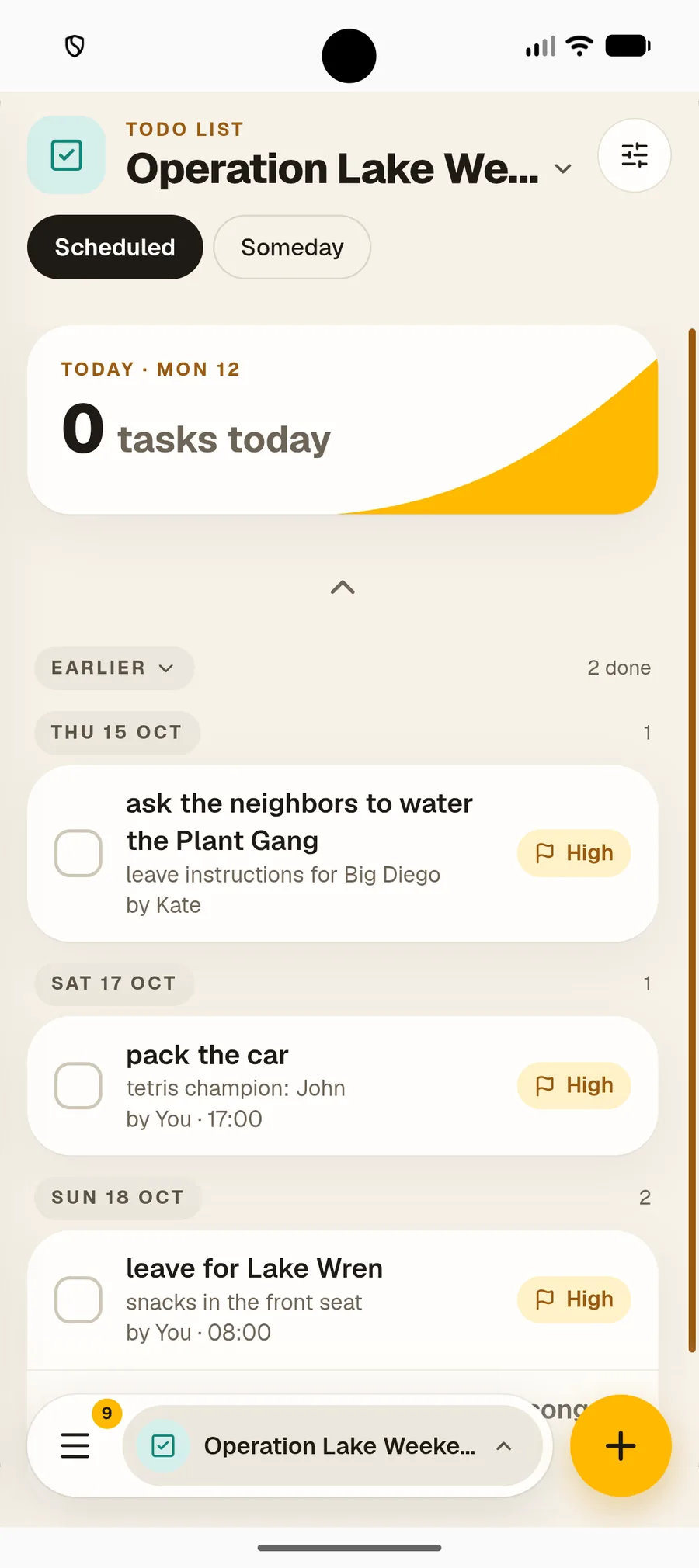
To-dos
Write it down, let it go
The things you keep remembering at 23:40 get a place on a list. Repeating jobs come back when they’re due, so you can stop carrying them around.
- ✓Repeating to-dos, like the bins every Sunday
- ✓Private lists, or shared with your people
- ✓Tick it off and it’s gone


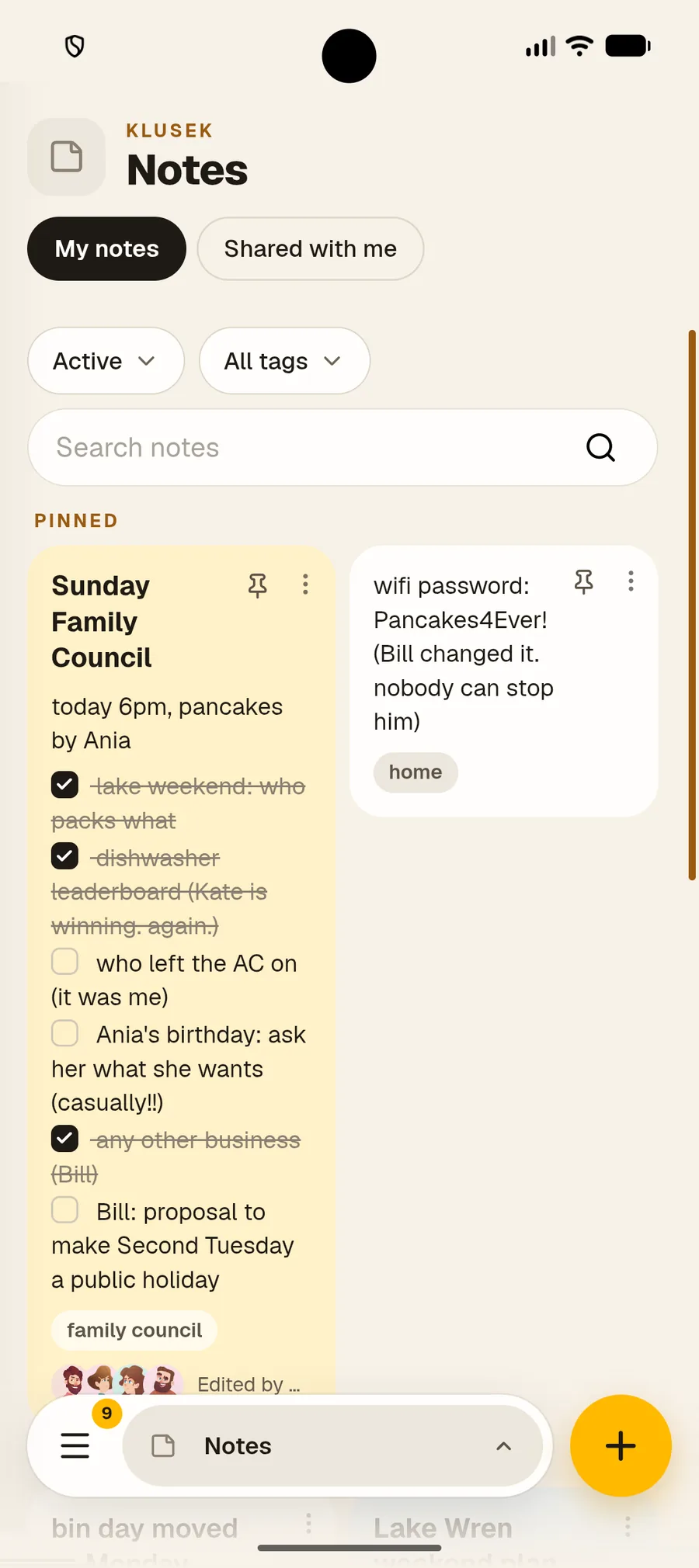
Notes
A tidy home for your thoughts
Plans, ideas, packing lists and passwords on one calm board. Pin what you need today, colour and tag the rest.
- ✓Notes and checklists
- ✓Pin, colour and tag every note
- ✓Search every note in seconds

One Klusek Pass
Your calm space, free
Every module is free for yourself, forever. One Klusek Pass, $29.99 a year, adds sharing with the people in your life.
-
01
Start free
Create an account and use every module for yourself, free. Your first 30 days of Klusek Pass are on us. No card needed.
-
02
Share when you’re ready
Invite your partner, family or roommates to the lists you share. They join free.
-
 03
Keep it going
$29.99 a year, no per-person pricing. If you stop, nothing is deleted: shared lists turn view-only until you renew.
Common questions
Good to know before you start
Do the people I share with have to pay?
+
No. Only the person who shares needs a Klusek Pass. Invite your partner, family or roommates for free: they get full access to everything you share with them, with the role you choose. They can also use every module for themselves on the free plan.
Can one app really organize my life?
+
It can hold the everyday part: to-dos, notes, plans, shopping, plants, recipes, guest lists and the money you share. Klusek puts them in one calm place, so you don’t need a different app for each.
Is Klusek the Calm meditation app?
+
No. Klusek is a different product: a calm app to organize your life and your home. It has no meditation or sleep content.
Will Klusek send me lots of notifications?
+
No. Changes in a shared list are grouped into one email or push, and you can switch each kind of notification off per list.
Does the free version have ads?
+
No. Klusek has no ads, in the free version or anywhere else.
Start today
Start Klusek for free
Every module is free for yourself, on Android and in any browser. One Klusek Pass, $29.99 a year, lets you share with the people in your life, who join free. Your first 30 days are free, no card needed.