


Maple, the family organiser, is closing at the end of the year, and everything your family keeps there needs a new home. If you're looking for a Maple family app alternative, the short answer is this: save your data first, then pick the next app by what you actually used Maple for, the calendar or the lists. There's time, so let's do it calmly.
What's happening to Maple
If the Maple app has been your family organizer (or organiser, if you're reading this in the UK), here's the news in full. Maple's own website says it plainly: "Maple will sunset on December 31, 2026." The company has been acquired by Wander. Here's what the page says about the practical side (growmaple.com, checked 23 October 2026):
- Your account stays active until 31 December 2026. After that it is closed and can't be opened.
- Your data stays fully accessible until then. After the shutdown it is deleted and can't be recovered.
- Connections to outside services, such as Google Calendar, Apple Calendar, Outlook and TeamSnap, end too.
- Annual Maple+ subscriptions won't renew. Monthly ones stay active until 31 December.
It's a kind, honest note. The team thanks the families who used it and says Maple helped "move the conversation around the mental load at home forward". That's a lovely thing to be able to say about an app, and it's why so many households will feel a little lost this winter.
The deadline is 31 December, but the easiest time to move is a quiet weekend in November, well before the Christmas lists start.
Before anything else: save what's in Maple
Maple's page recommends exporting or transferring your data before it closes. Whatever app you choose next, do this part first, while everything is still there:
- Look for an export option in Maple and save whatever it gives you. If you can't find one, don't worry. Copying by hand works for most families.
- Check your calendar events. Events that came into Maple from Google, Apple or Outlook calendars should still live in those calendars. Anything you typed straight into Maple may only exist in Maple, so copy the important ones, especially birthdays and anything that repeats.
- Copy your lists. The weekly shop, the chores, the "someday" jobs. Paste them into a note on your phone for now. It takes ten minutes and saves a lot of "what was on that list again?" in January.
- Screenshot the things you only glance at. The meal ideas everyone likes, the school term dates, the packing list for the summer trip.
- Write down who does what. If chores were assigned in Maple, note the names next to each one. That's the part people forget, and it's the part that took the longest to agree on.
What to look for in a Maple family app alternative
Every family used Maple a bit differently, so start with a simple question: what did you open it for most days?
- If it was the calendar (school runs, clubs, appointments), you want an app built around a shared calendar.
- If it was the lists (groceries, chores, to-dos), you want an app built around shared lists that everyone can tick off.
- If it was a bit of everything, it's fine to use two simple tools instead of one big one. Lots of families do.
Then a few practical questions. Does it work on everyone's phone? Does everyone in the house have to pay, or only one person? And will the people who never opened Maple actually open this one?
Cozi vs Maple: if the calendar was the heart
If your family lived in Maple's calendar, Cozi is the obvious place to look. It's been around for years and it's built for exactly this. Its homepage describes a shared family calendar with a colour for each person, grocery and to-do lists that update for everyone, and a meal planner with a recipe box. The basic version is free (cozi.com, checked 23 October 2026).
Cozi Gold costs $39 a year and adds an ad-free version, a month view on mobile, calendar search, up to three reminders per event, a birthday tracker and a shopping mode (cozi.com/cozi-gold, checked 23 October 2026). For a calendar-first family that's a fair price for a calm morning.
If what you liked most in Maple was seeing the whole week at a glance, Cozi will probably feel the most familiar.
Klusek: if the lists and plans were the heart
Klusek isn't a calendar, so we won't pretend to replace that part of Maple. What it does well is the rest of running a home together: a shared shopping list, shared to-dos with a day for each chore, plant watering, notes, shared expenses and guest lists. Each one is its own module, and you only use the ones you need.
For the bigger things, like Christmas, a birthday or a move, there are Projects. That's where many Maple families will feel at home.
Or mix and match
There's no rule that says one app has to do everything. A lot of households end up with a shared Google or Apple calendar for the dates, because everyone already has one on their phone, and a separate app for the lists and jobs. If that's you, keep the calendar where it is and move only the lists.
It's also worth reading our post on the signs your home runs on one person's memory while you're moving things. A change of app is a lovely, low-drama moment to hand over a few jobs, so the new setup doesn't end up living in one head again.
How Klusek helps with this
In our flat, anything bigger than a weekly shop gets its own project in Klusek. A project brings several tools together under one name: a budget that shows who owes whom, a food shopping list, the to-dos with dates, a guest list and notes. You pick the tabs you need and name them your way, like "Food" and "Decorations".
You share the project once, and everyone you invite gets every tab inside it, including the ones you add later. The first tab is an overview: what's been spent, what's left to buy, who's coming and what still needs doing.
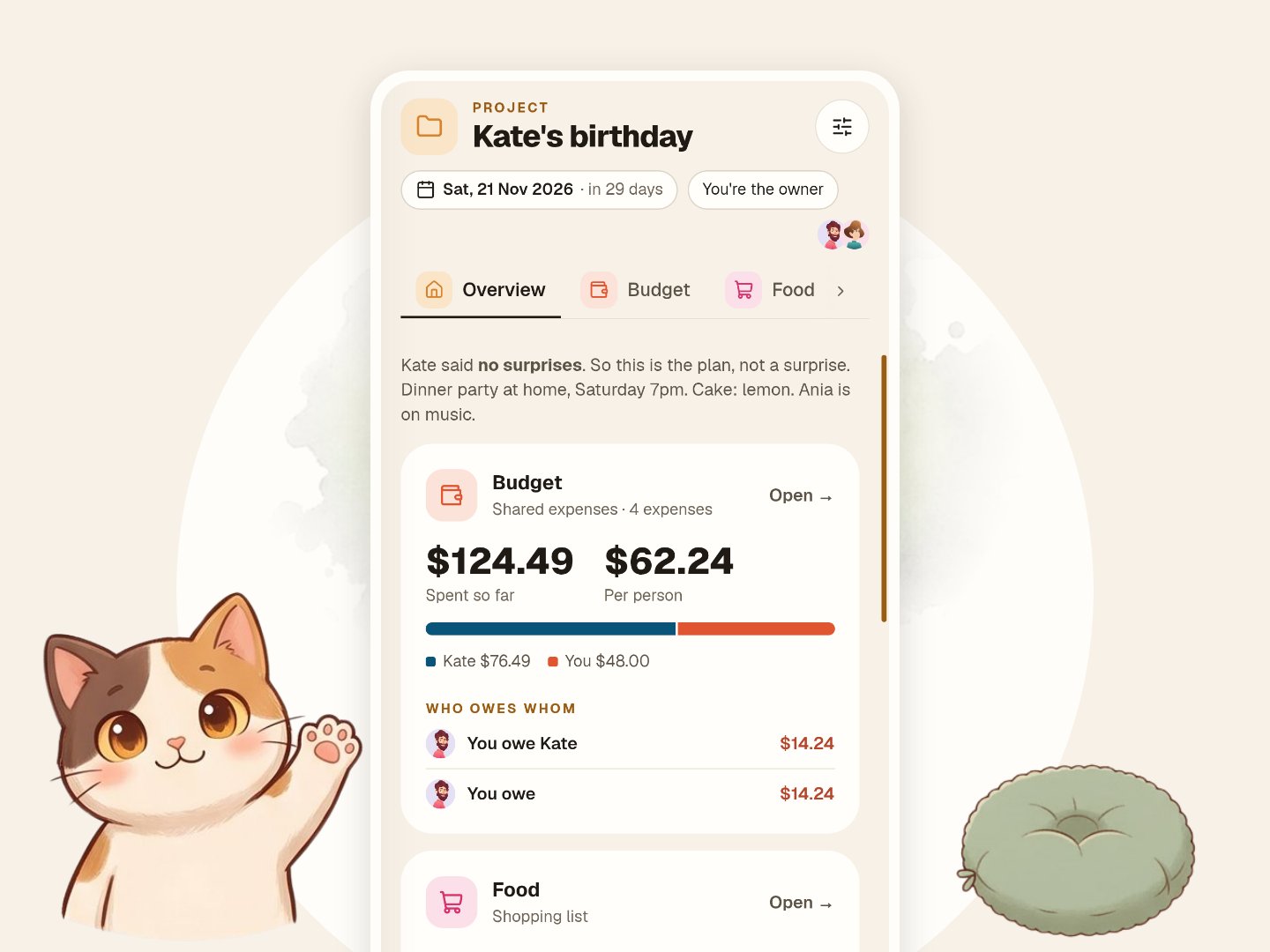
Every module is free when you use it on your own. Klusek Pass adds sharing and Projects for $29.99 a year or $17.99 for 6 months, and new accounts get 30 days free, no card. Only one of you pays. The people you invite join for free and get full access to everything you share with them. Klusek works as an Android app and in any browser, and the iPhone app is coming soon. If you're a big household, our page for families shows how others set it up.
Take your time
Leaving an app you liked is a small loss, and it's fine to feel a bit annoyed about it. You set it up, you got everyone using it, and now you have to do it again.
So be gentle with yourself. Save your lists this week, pick the next home in November, and let the family try it for a fortnight before Christmas. By the time Maple switches off, the shopping list will already be somewhere new, and someone else might even be adding the milk.